Brokerage CRM & Back Office
Where sales, dealing and compliance share one record.
Leads, campaigns, customer 360, KYC, finance, dealing and roles — in one back office that is wired to the trading platform your clients use.
Leads and campaigns
A lead pipeline you can steer.
The CRM is built around the way brokerage sales floors work: volume in, fast contact, clear ownership, and a clean hand-off to onboarding.
- 01
Lead table with saved views
Global or personal, drag-ordered saved views, URL-synced multi-select filters, a column picker, and tiles for total, new, qualified, converted and high-priority leads.
- 02
A lead record that stays current
Inline editing of status, assignee, language and custom attributes; notes and an activity timeline; tasks with priority and due dates; previous/next navigation; convert to customer.
- 03
Import wizard
CSV analysis, column mapping, default assignee and status, and duplicate detection with “ignored” and “updated” counts. Export the whole current view.
- 04
Bulk actions and instant contact
Change status, assign (including unassigned), delete or convert in bulk. Click-to-call and WhatsApp links sit next to every phone number.
- 05
A configurable pipeline
Statuses with colour and order, and required contact attempts before a status can change. Nine statuses to start with: New, Contacted, Qualified, Proposal Sent, Negotiating, Converted, Lost, Unqualified and On Hold.
- 06
Campaigns
Facebook Lead Ads or a landing-page webhook as the source, a five-step editor (source, fields, mapping, defaults, review), a submissions log with reprocess, and new leads arriving every minute.
Customer 360
Everything about a client, on one screen.
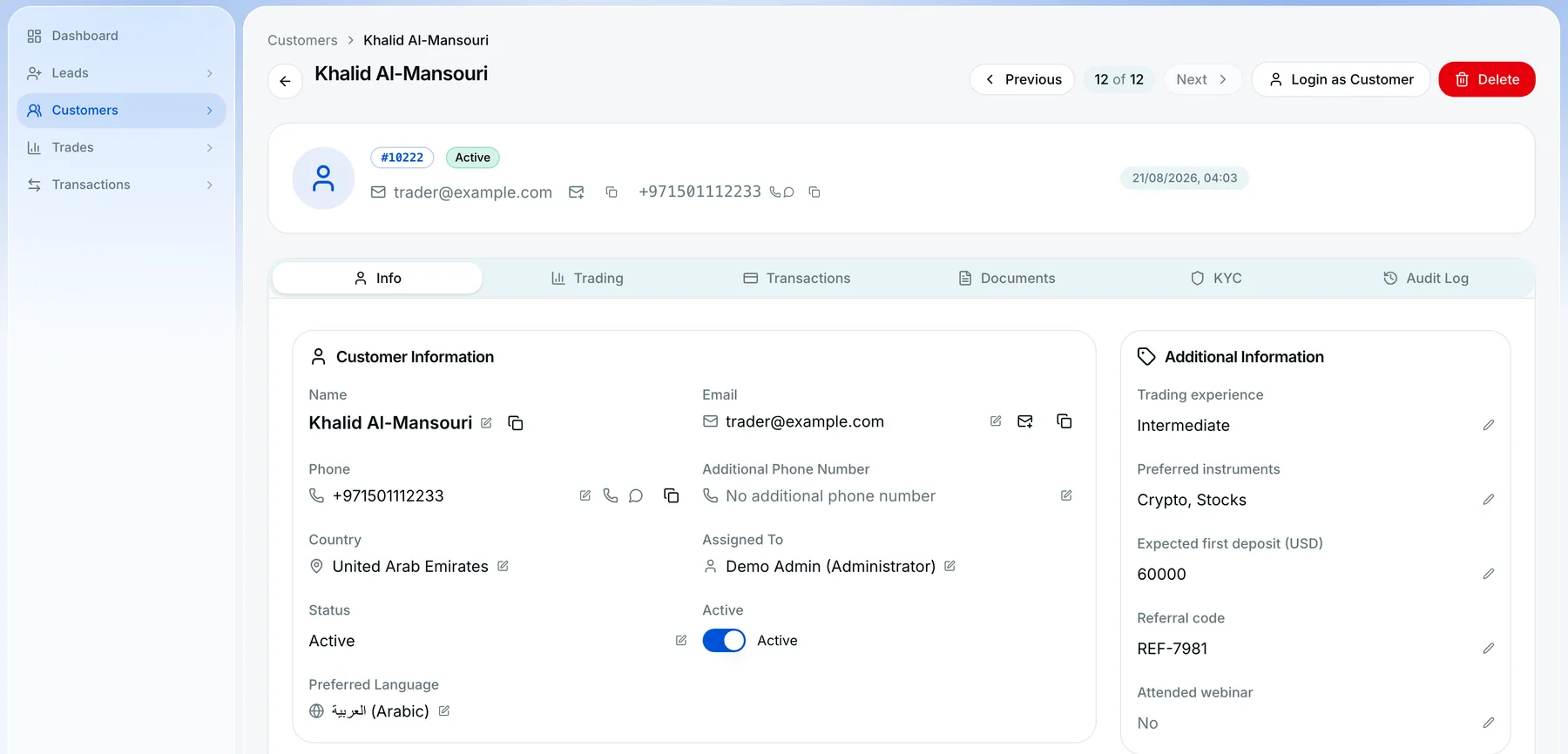
A customer record carries six tabs — Info, Trading, Transactions, Documents, KYC and Audit Log — with inline editing, assignee, active toggle, preferred language, custom attributes, addresses and notes.
From the record your team can log in as the customer (with a banner and a stop button), call, open WhatsApp, send a quick email, create a trade on the client’s behalf, or record a manual deposit.
- 9
- lead statuses by default, fully configurable
- 5
- ready-made roles — Administrator, Manager, Agent, Support Agent and Compliance Officer — plus your own
- 70+
- audit event types, with before-and-after values
- 19×6×4
- modules, actions and data scopes in the permission matrix
Dealing desk, finance and control
The operational side, connected to the engine.
- 01
KYC queue
Filters and export, a review page with document preview, approve, reject or create-and-approve. Every status change fires the notifications you configure.
- 02
Trades and dealing desk
Open positions, pending orders and history across all clients. Create, edit (entry, lots, SL/TP), close, partially close, reopen or cancel; bulk cancel and modify; a market-hours override for staff.
- 03
Trading accounts and instruments
Balance, equity and margin per account, with recalculation. Instruments with symbol, type, lot information, spread type and value, leverage limits, contract size, stop and gap levels, fees and funding model; catalogue tools activate only the symbols your data plan serves.
- 04
Transactions and payment methods
Deposits, withdrawals and further transaction types with pending, completed, failed and cancelled statuses, creator and method filters and export. Manual or processor-backed payment methods with limits, fees and processing time.
- 05
Roles and permissions
Employees with titles, supervisors and an org chart. Navigation and buttons disappear when a role lacks the permission, and data scopes decide whose records a person sees.
- 06
Global search and exports
A Cmd/Ctrl+K search across customers and leads, saved views and CSV or XLSX export on every major list.
Good to know
Lead views that fit your team
Leads work as a filterable table with saved views and configurable statuses.
WhatsApp and SMS channels
The CRM links to WhatsApp from every number and sends notifications through WhatsApp Business and SMS templates. Conversations themselves continue in WhatsApp.
Dashboard tiles and exports
Follow lead and customer activity on dashboard tiles, and export any major list.
Leads, dealing, permissions and audit.
Can leads from Facebook flow in automatically?
Yes. Connect Facebook Lead Ads once, map the form fields once, and new leads arrive every minute. Landing-page forms can post through a webhook campaign.
Can my dealers trade for a client?
Yes. From the customer record, staff with the right permission can create or edit trades on a client’s behalf and manage open positions from the Trades page.
How granular are permissions?
A matrix of 19 modules by 6 actions (view, create, edit, delete, import, export) by 4 data scopes (mine, my reports, my team, all), over an employee hierarchy.
Is there an audit trail?
Yes — more than 70 event types with before-and-after values, filterable and exportable, and shown on each customer record.
Is it a CRM only, or a full back office?
Both, in one workspace. The CRM covers leads and customers, the KYC review queue, deposit and withdrawal approvals, the dealing desk, employee roles and the audit trail. It reads the trading engine directly, so there is no separate system to keep in sync.
Connected to the rest of the operation.
See the CRM on your own workflow.
Tell us how your sales, dealing and compliance teams work today. The demo follows that workflow.